Comparing JavaScript Frameworks part 2: reactivity
In this blog post series I will compare the following JavaScript frameworks: Vue.js, React, Angular, and Svelte.
In part 1 we looked at the template languages of the frameworks. In part 2 we are going to look at the reactivity systems of the frameworks.
In a JavaScript frameworks the reactivity system updates / re-renders the view or runs an effect whenever a piece of state changes. The chosen reactivity system has a huge effect on the developer experience.
So lets take a look at how the frameworks handle reactivity.
A big shout out to all people how read part one and gave me a ton of suggestions / fixes thank you!

Why do reactivity systems exist?
First I want to answer the question why a reactivity system is needed at all?
The answer is that JavaScript does not provide a way to observe variables and objects out of the box.
Let's dig in a little deeper to make sense of this answer. Take a look at this variable:
let age = 42;Say on the press of a button you change the variable:
age += 1;Now how do you make sure that the function below is called whenever age changes?
function onAgeChanged() {
  // re-render all elements that use 'age'
}
JavaScript does not offer an API to listen to changes of variables / objects. So you have to write something yourself. That something is called a reactivity system.
If only JavaScript had an API that would inform you of changes in a variable / object, it would certainly make the life of JavaScript framework maintainers easier!
But alas this is not the case, so let's find out what reactivity systems the frameworks came up with! I think the best way to do this is to compare writing the same components in multiple frameworks. This allows us to see the tradeoffs to their approaches.
Counter
Lets look at a Counter component it renders a number surrounded by two buttons, one button to increment the number and one button to decrement the number.
The Counter example demonstrates how the frameworks make primitive values reactive in JavaScript. Primitive values types in JavaScript are string, boolean and number, but also include null and undefined. They are stored more directly in memory without being pointers / references and can be compared directly.
We already know there is no way to observe / get informed of changes of JavaScript variables, so how do the frameworks get around this?
Angular is up first:
import { Component } from '@angular/core';

@Component({
  selector: 'counter',
  standalone: true,
  template: `
    <button (click)="decrement()">-</button>
    {{ count }}
    <button (click)="increment()">+</button>
  `,
})
export class CounterComponent {
  public count = 0;

  increment() {
    this.count++;
  }

  decrement() {
    this.count--;
  }
}
Angular relies on a library called zone.js, which is a critical part of Angular, and it is also created / maintained by the Angular team.
What zone.js does is dig its tendrils deep into standard browser APIs and replaces them with wrappers. These wrappers when called will perform the original action, and inform Angular that a possible change occurred.
So in our example because we hit the buttons an addEventListener callback gets triggered, and zone.js is "spying" on it can tell Angular to check for changes.
What Angular then does is go through the component template and checks if any value has changed, by comparing the old value with the new value, and if so update the DOM.
So Angular does not know what exactly has changed, but only that something has changed! This makes Angulars reactivity coarse instead of fine grained.
A framework has fine grained reactivity it has to do very little do determine what has changed. When a framework has coarse reactivity it has do to more work to figure out what has changed.
In other words: with fine grained reactivity the framework knows exactly what has changed, with coarse grained reactivity it knows that something has changed.
The terms coarse and fine grained come from sanding paper! The coarser the sanding paper the rougher the wood feels. The finer the grain on the sanding paper the smoother the wood feels.
Lets take a look at Vue next which is more fine grained:
<script setup lang="ts">
  // This script is ran once when the component is initialized!

  import { ref } from 'vue';

  // Create a reference, when the reference changes,
  // Vue updates all uses of the reference.
  let count = ref(0);

  function increment() {
    count.value++;
  }

  function decrement() {
    count.value--;
  }
</script>

<template>
  <button @click="decrement">-</button>
  {{  count  }}
  <button @click="increment">+</button>
</template>
In Vue reactivity is very explicit, the only things that are reactive are the things you the developer marks as reactive. One way to mark a variable as reactive is using Vue's ref function.
Remember that in JavaScript you cannot listen to changes of variables directly, but you can apply a neat trick: you can wrap a variable in an object and through that object know when things change. Which is exactly what ref does.
So the return value of ref(), a JavaScript object, acts as a proxy for the actual value. The actual value is stored in the value property. Whenever you want to change the value or read it you use the value property.
The value property is a setter behind the scenes. So whenever you reassign the value Vue knows the value has been changed! Then Vue can update the DOM with laser precision and update all uses of the ref in the template.
One extra thing to note is that in Vue templates the .value is not necessary. Whereas it is necessary inside of the script. I think it unfortunate that the .value is necessary inside of the template, as I tend to forget it.
The tradeoff however is that Vue knows exactly what has changed! This makes Vue's reactivity more fine grained that Angulars reactivity.
Now lets look at Svelte approach:
<script lang="ts">
  // This script is ran once when the component is initialized!

  let count = 1;

  function increment() {
    count++;
  }

  function decrement() {
    count--;
  }
</script>

<button on:click={decrement}>-</button>
{ count }
<button on:click={increment}>+</button>
At first glance Svelte seems to defy everything I've said about it being impossible to know when a JavaScript variable has changed!
The way Svelte works is that you code is compiled by the Svelte compiler. The compiler turns every top level let in a component into a reactive variable.
This achieves fine grained reactivity but it makes it a little hard to determine what is actually a reactive variable. You have to know Svelte's rules by heart.
If you read the previous post you know Svelte is about to introduce a new API called runes. It will make what is reactive more explicit like Vue. The reason for this is because the creators of Svelte recognized that Svelte's subtle reactivity makes it somewhat difficult to reason about.
With runes the definition of count will turn into this:
let count = $state(1);With runes Svelte is more inline with Vue since making things reactive is more explicit. The biggest difference between Svelte and Vue is that Svelte's reactivity is done via a compiler. Which is why there is no need for a .value abstraction like the one in Vue.
Fun fact: at one point the creators of Vue investigated using a compiler for reactivity called "Reactivity Transform". Here is a link to a GitHub issue explaining the reasons why they did not go forward with it.
React is the last to go:
import { useState } from 'react';

// This Counter function is ran whenever the count changes!
export function Counter() {
  const [count, setCount] = useState(0);

  function increment() {
    setCount(count + 1);
  }

  function decrement() {
    setCount(count - 1);
  }

  // Sidenote: in React you can only return one JSX node
  // per component, otherwise you get an error. By
  // using <>, which is called a Fragment, you get around
  // this error. The <> does not show up in the actual DOM!

  return (
    <>
      <button onClick={decrement}>-</button>
      {count}
      <button onClick={increment}>+</button>
    </>
  );
}
In React components are functions, whenever the state or props of a component change the function is called /executed. The JSX that the component returns is then compared with the previously returned JSX, and the differences are changed in the DOM.
In this way Angular and React use the same strategy: they both have to check for changes. This makes React, like Angular, coarse grained.
The useState hook allows you to tell React to store a variable for the duration of the lifecycle of the component. The first parameter to the useState function is the initial starting state.
useState returns an array with two items: the first item contains the actual value. The second item contains a function to update the value, this is called a "setter" in React.
By returning an array, and through clever use of the destructuring syntax, you can name these items yourself. In our case count and setCount.
Whenever a setter, in our case setCount, is called React knows that it needs to re-render the component. This will make React call / re-render the component function again, only this time count will have a new value.
If you do not use setState, but instead maniplute the value directly, for example by using a assignment such as count = 10. React will not "see" the changes, and therefore not re-render.
Note that for all previous examples in the other three frameworks, I did not have to explain their APIs in such detail! The reason for this is because a React component is a repeatedly called function.
This has some ramifications...
Since the function is called multiple times, you cannot simply define a let variable as it will be re-initialized at each call. So the state needs to be stored outside of the function. useState does exactly this, it stores the state somewhere in React.
Behind the scenes this process works like this: each time a component is rendered for the first time, an empty array representing the state created for that components instance. Each call to useState appends a "state variable" to the list.
When the component re-renders each call to setState will return the an item from the "state array", based on how many times setState was called. The first call receives the state at index 0, the second at index 1 etc etc.
This means that the order of useState is they way React identifies state!
This brings us to a React caveat: you cannot make useState calls conditional. Since React then has no reliable way to identify which "state" is which. Trying to make a hook conditional will result in an error.
All in all the choice of using a function makes the React example more difficult to understand. But on the other hand because they still JavaScript functions, it is easy to understand how they are evaluated.
A keen observer will also notice that the increment and decrement functions are redefined for each call of Counter. There is a performance impact due to this but negligible, as JavaScript can quickly whip up these functions.
Todo list
A TodoList component shows the user a list of todos, such as a shopping list, and allows the user to mark the todos as done. It provides a form to add a new todo.
This will demonstrate how the frameworks handles dealing with arrays and objects, instead of primitive values like strings, booleans and numbers.
Let's kick it off with Svelte:
<script>
  let newTodo = '';

  let todos = [
    { id: crypto.randomUUID(), text: 'Buy groceries' },
    { id: crypto.randomUUID(), text: 'Do taxes' } ,
    { id: crypto.randomUUID(), text: 'Goto birthday party' }
  ];

  function markAsDone(id) {
    todos = todos.filter((todo) => todo.id !== id);
  }

  function onSubmit(event) {
    event.preventDefault();

    todos = [...todos, {
      id: crypto.randomUUID(),
      text: newTodo
    }];

    newTodo = '';
   }
</script>

<ol>
  {#each todos as todo}
    <li>
      { todo.text }
      <button
        on:click={() => markAsDone(todo.id)}
      >
        Done
      </button>
    </li>
  {/each}
</ol>

<form on:submit={onSubmit}>
  <label for="new-todo">
    New todo
  </label>

  <input id="new-todo" bind:value={newTodo} />

  <button type="submit">Add todo</button>
</form>
At first glance working with arrays and objects in Svelte does not seem so different from working with primitive values. But pay close attention to the following line:
todos = [...todos, {
  id: crypto.randomUUID(),
  text: newTodo
}];
Why are we using the spread (...) operator to append a new item to the todos array? Why not simply call todos.push() instead?
The reason for this is that the Svelte compiler requires a reassignment for Svelte to detect the change in a variable. If there is no = the change goes right past Svelte.
Another thing of note in the code is the way you bind a variable to a form input. In Svelte this is accomplished via the bind prefix on a property. Whenever input changes the variable changes, but also vice versa, when the variable changes the input changes as well. This is often referred to as two-way binding.
Let's contrast Svelte with Vue:
<script setup>
import { ref } from 'vue'

const newTodo = ref('');

const todos = ref([
  { id: crypto.randomUUID(), text: 'Buy groceries' },
  { id: crypto.randomUUID(), text: 'Do taxes' } ,
  { id: crypto.randomUUID(), text: 'Goto birthday party' }
]);

function markAsDone(id) {
  todos.value = todos.value.filter(
    (todo) => todo.id !== id
  );
}

function onSubmit(event) {
  event.preventDefault();

  todos.value.push({
    id: crypto.randomUUID(),
    text: newTodo.value
  });

  newTodo.value = '';
}
</script>

<template>
  <ol>
    <li v-for="todo in todos" :key="todo.id">
      {{ todo.text }}
      <button @click="markAsDone(todo.id)">Done</button>
    </li>
  </ol>

  <form @submit="onSubmit">
    <label for="new-todo">
      New todo
    </label>

    <input id="new-todo" v-model="newTodo" />

    <button type="submit">Add todo</button>
  </form>
</template>
The Vue example is kind of straight forward due to the way the ref API works. Behind the scenes all refs are Proxy objects. In JavaScript a proxy allows you to do something whenever a method called or a variable is accessed.
Vue uses Proxy to act as a spy, listening and watching for all changes. This way when calling todos.value.push the proxy sends Vue a message: "hey the array was mutated you need to re-render".
Like Svelte, Vue supports two way binding via the v-model directive. You assign it to a ref so the two always stay in sync.
React is up next:
import { useState } from "react";

export function TodoList() {
  const [newTodo, setNewTodo] = useState("");

  const [todos, setTodos] = useState(() => [
    { id: crypto.randomUUID(), text: "Buy groceries" },
    { id: crypto.randomUUID(), text: "Do taxes" },
    { id: crypto.randomUUID(), text: "Goto birthday party" },
  ]);

  function markAsDone(id) {
    setTodos(todos.filter((todo) => todo.id !== id));
  }

  function onSubmit(event) {
    event.preventDefault();

    setTodos(
      [...todos, { id: crypto.randomUUID(), text: newTodo }
    ]);

    setNewTodo("");
  }

  return (
    <>
      <ol>
        {todos.map((todo) => (
          <li key={todo.id}>
            {todo.text}
            <button
              onClick={() => markAsDone(todo.id)}
            >
              Done
            </button>
          </li>
        ))}
      </ol>

      <form onSubmit={onSubmit}>
        <label htmlFor="new-todo">New todo</label>

        <input
          id="new-todo"
          value={newTodo}
          onChange={(e) => setNewTodo(e.target.value)}
        />

        <button type="submit">Add todo</button>
      </form>
    </>
  );
}
The first thing I would like to note is that React does not support two way binding out of the box. You have to use valueand onChange and bind it via a useState yourself to the input element.
The second thing is that you can also provide useState with a function. That function is only called on the initial render, and the return is used as the initial value. This is a performance optimization so the todo's array is not initialized, and then immediately discarded on every subsequent render.
Remember: React components are function which are repe
In React, like in Svelte, you must use the spread operator append a todo. The reason for this is if we wrote the code like this:
todos.push({ id: crypto.randomUUID(), text: newTodo });
setTodos(todos);
React will not detect any changes and re-render. The reason for this is that when you give a setter such as setTodos the same value as before React ignores the change. This is a performance optimization in React, calling setState with the same value should change nothing.
This however get especially tricky with objects and arrays. In JavaScript arrays and objects are pointers / references. When assigning an array / object to a variable such as const x = [];, what x is is not an array but a pointer to the array in memory.
So when we call setTodo(todos) React looks at the pointer, which is still the same, and not at the fact that the todos array has a new item / todo. React will not re-render the component.
Now here is the fun bit, if you changed the code from:
function onSubmit(event) {
  event.preventDefault();

  setTodos(
    [...todos, { id: crypto.randomUUID(), text: newTodo }
  ]);

  setNewTodo("");
}
to the following using push:
function onSubmit(event) {
  event.preventDefault();

  todos.push( { id: crypto.randomUUID(), text: newTodo });
  setTodos(todos);;

  setNewTodo("");
}
The change detection still works fine! How is this possible? You just read a couple of paragraphs saying it would not!
The reason is the call setNewTodo which does receive a new value. React will kind of accidentally re-render the component now and render the new todo. Bob Ross would call this a happy accident. I call this lucky.
Finally lets look at the Angular version:
import {Component} from '@angular/core';
import {CommonModule} from '@angular/common';
import {FormsModule} from '@angular/forms';

@Component({
  selector: 'my-todo-list',
  standalone: true,
  imports: [CommonModule, FormsModule],
  template: `
    <ol>
      <li *ngFor="let todo of todos">
        {{ todo.text }}
        <button (click)="markAsDone(todo.id)">Done</button>
      </li>
    </ol>

    <form (ngSubmit)="onSubmit($event)">
      <label for="new-todo">
        New todo
      </label>

      <input
        id="new-todo"
        name="newTodo"
        [(ngModel)]="newTodo"
      />

      <button type="submit">Add todo</button>
    </form>
  `,
})
export class TodoListComponent {
  public newTodo = '';

  public todos = [
    { id: crypto.randomUUID(), text: "Buy groceries" },
    { id: crypto.randomUUID(), text: "Do taxes" },
    { id: crypto.randomUUID(), text: "Goto birthday party" },
  ];

  markAsDone(id: string) {
    this.todos = this.todos.filter(
      (todo) => todo.id !== id
    );
  }

  onSubmit(event: SubmitEvent) {
    event.preventDefault();

    this.todos.push({
      id: crypto.randomUUID(),
      text: this.newTodo
    });

    this.newTodo = '';
  }
}
The Angular code looks quite a lot like normal code. We can use push on todos and Angular simply detects the changes.
The only thing of note here is that Angular requires the FormsModule in order to get two-way binding to work via the [(ngModel)].
This implementation took me the longest due to a subtle bug. An [(ngModel)] apparently only works when a name property is also set on the input element! Don't you love it when an API is subtle like this.
Fine grained vs course grained reactivity
Looking at the Angular code you might think: hey this code looks pretty "normal". There is no setState like in React, or a .value like in Vue, and unlike Svelte you can pushvalues into an array. Is Angular winning?
The answer lies the in fine grained vs coarse grained reactivity.
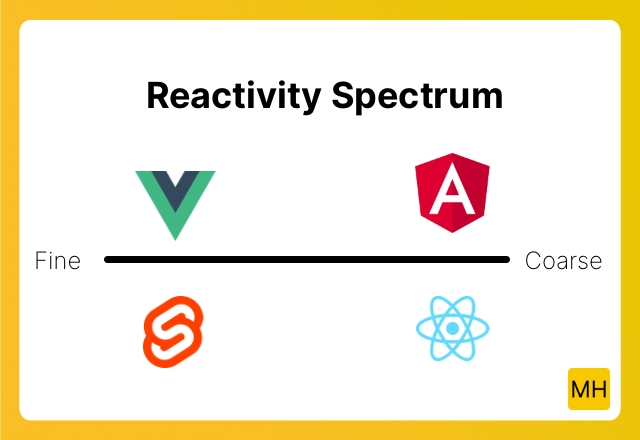
Performance wise fine grained reactivity is faster. This is because the computer has to do less work in order to determine what has changed.
Fine grained reactivity does come at an cost however. You as a developer must tell the computer how you want various pieces of state to reactively work together.
The Angular team has decided to adopt a more fine grained reactivity by embracing Signals. This means that on the altar of performance Angular will in the future sacrifice the easygoing API.
Signals is this idea that you provide an API to indicate relationships between pieces of state. Take this pseudo code example here:
// Create the signal, the return value of signal
// is a function that when called returns the
// current value.
const count = signal(1);

// Define another signal called double
// defined / computed based on the count signal.
const double = computed(
  () => count() * 2
);

function increment() {
  // Changing count will cause `double` to be recomputed.
  count.set(count() + 1);
}

// Then somewhere in the template:
<p>The count is {{ count() }} double is {{ double() }}</p>

<button onclick={increment}>{{count()}}</button>
The idea of Signals is that by telling the framework what the dependencies between pieces of state are, the frameworks can become more efficient.
The idea of Signals is not a new one, Knockout.js and Ember.js was the first time I encountered this idea. Recently the idea has resurfaced due to the fact that SolidJS, another JavaScript framework, based its reactivity system around Signals.
I was torn about including SolidJS in this series, but I had to limit the frameworks due to time constraints. For all you SolidJS fans out there my apologies.
There is even talk of adding Signals to JavaScript itself you can read and follow the Signal proposal here.
Conclusion
We now know why reactivity systems are needed: there is no good way of tracking changes on JavaScript variables, for either objects or primitive values.
This means that each framework has to come up with a solution for this problem. Each framework must balance the simplicity of using the reactivity system, with potential performance costs.
It is opinion time:
In my opinion Angular currently provides a very straight forward reactivity system in terms of developer experience. It really is a joy to use as the code reads like regular old JavaScript / TypeScript.
But we also know that Angular is going for Signals in the future sacrificing the developer experience a little for performance gains.
I happen to like the Signals API. It kind of feels like Promises did a couple of years back: a good primitive to build framework reactivity systems around.
Svelte's system currently feels a bit magical. Take for example the Array.push not working. This took me by surprise. in React this also does not work, but at least in React when calling the setter, I was trigged: "will this work". Whereas in Svelte I kind of expected it to simply do its compiler magic and that it would work.
I hope runes which are coming soon, which are powered by Signals, will make using Array.push possible.
Vue's ref API initially took me some getting used to, but I do like the fact that Vue does not hide behind magic just proxies. Which for some may feel magical, but for me is something I know and used in my code before.
Perhaps this is not a popular opinion but I wished Vue would force the .value in the template as well!
React due to the fact that component functions are called repeatedly does requires it to have a bit of a funky API. In the end though it is just a getter / setter pattern. I do miss my Array.push.
All reactivity systems are a bit opaque. I which they were not needed. But as long as you read about their specific rules none are to difficult to use.